Professional · Frontend Engineer · 2024–2026
Turning carbon-accounting rules into a usable product
Business emissions data is full of dependencies. Location changes required fields, vehicle type changes fuel questions, employee and distance values must agree, and units and periods must reach the API in a stable shape. I designed and implemented the frontend flow that shows those rules at the right moment, without asking users to understand the calculation model.
- 5 reporting categories
- 3 iterations
- Role
- Frontend Engineer at Karbon-X, 2024–2026. I led the calculator’s frontend from the public estimate through the portal, and I was the primary frontend engineer for the 2026 redesign.
- Partnered with
- Sustainability specialists, Back-End developers, designers, and stakeholders
- Status
- Shipped in 2024, then carried into the portal and the 2026 redesign. The redesign was still in progress when I left in May 2026.
- In the code
- Zod schemas and request helpers hold the rules outside the components, with tests on the branches that would otherwise reach the API.
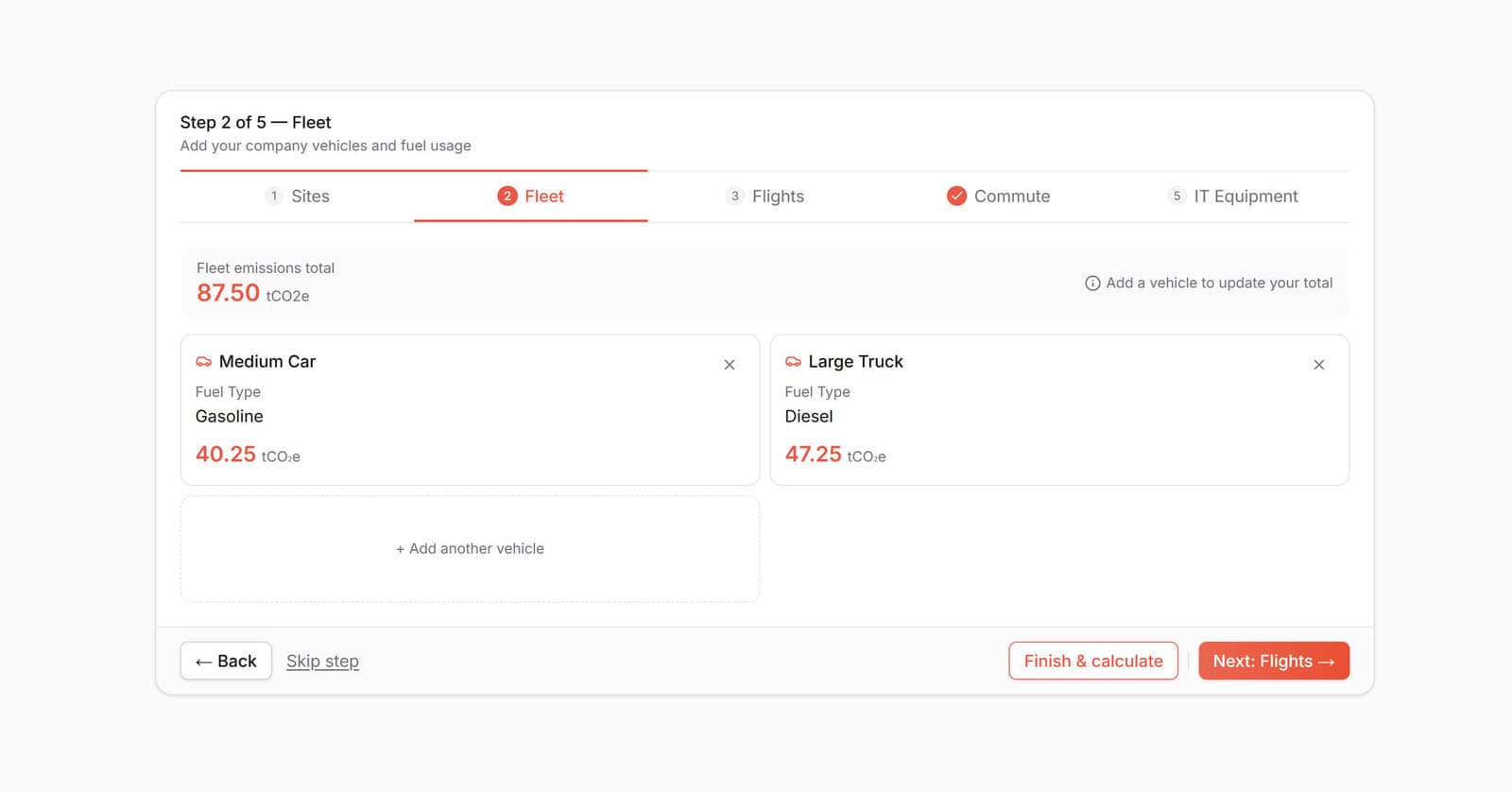
One capability, three contexts
The calculator was not three separate builds. The same five categories moved from an anonymous estimate, to a saved record inside the customer portal, to a modernized module with its rules pulled out of the components.
2024
Public estimate
Anonymous business visitors on the original platform.
- Multi-step estimate across business emissions categories.
- Results lead into a conversation with the Karbon-X team.
Released in October 2024 with the first platform, in time for the start of the Edmonton Oilers season.
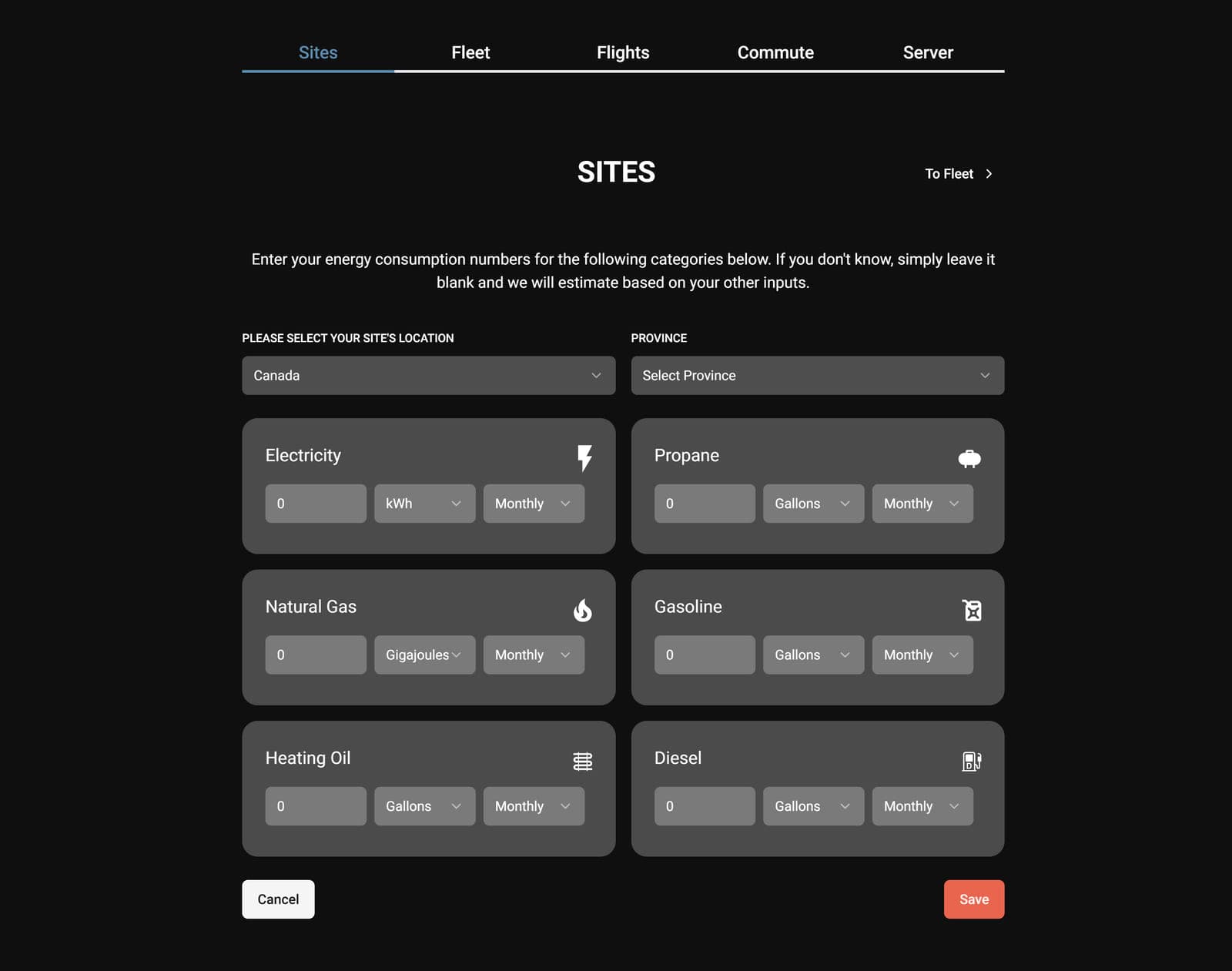
2024 public estimate. The fifth category is labeled Server. Canada asks for a province because regional factors differ. 2025
Saved calculations in the portal
Signed-in business customers.
- Calculations are saved, listed, reopened, and edited by category.
- Leaving with unsaved changes asks for confirmation.
- A single category can be handed to the cart for offsetting.
The portal shipped in July 2025. I owned editing, saving, protection against unsaved changes, and per-category offsets.
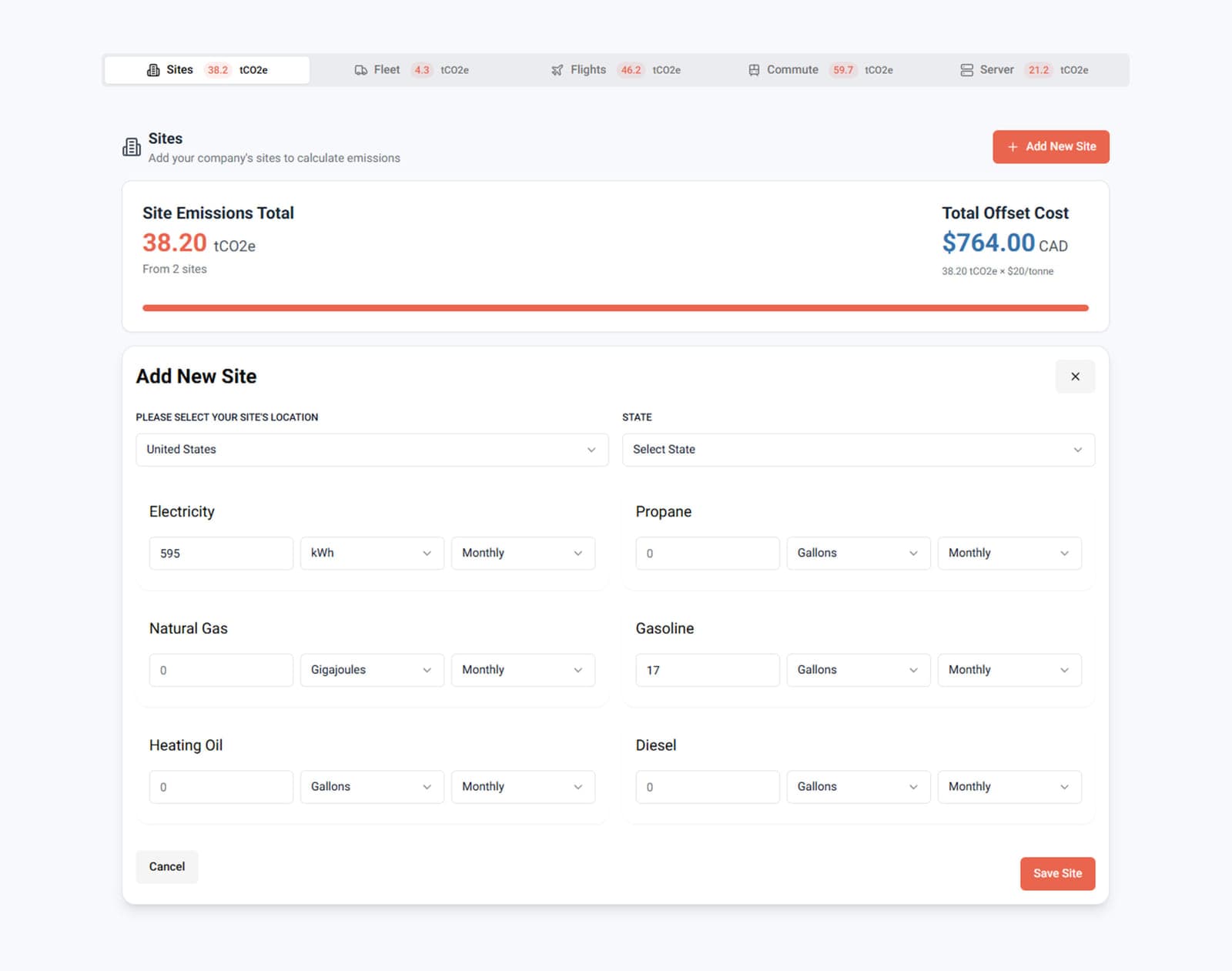
2025 portal. A calculation is saved and edited by category, with a per-category offset. Server is still the label. Amounts are sample figures from this capture. 2026
Modernized module
The redesigned public site, unfinished as of May 2026.
- Domain rules live in Zod schemas, outside the step components.
- Request helpers convert form values into stable API payloads.
- Users can skip a step or finish early with partial results.
I led the frontend for the 2026 redesign until May 2026. It was still in progress when I left, not a finished replacement.
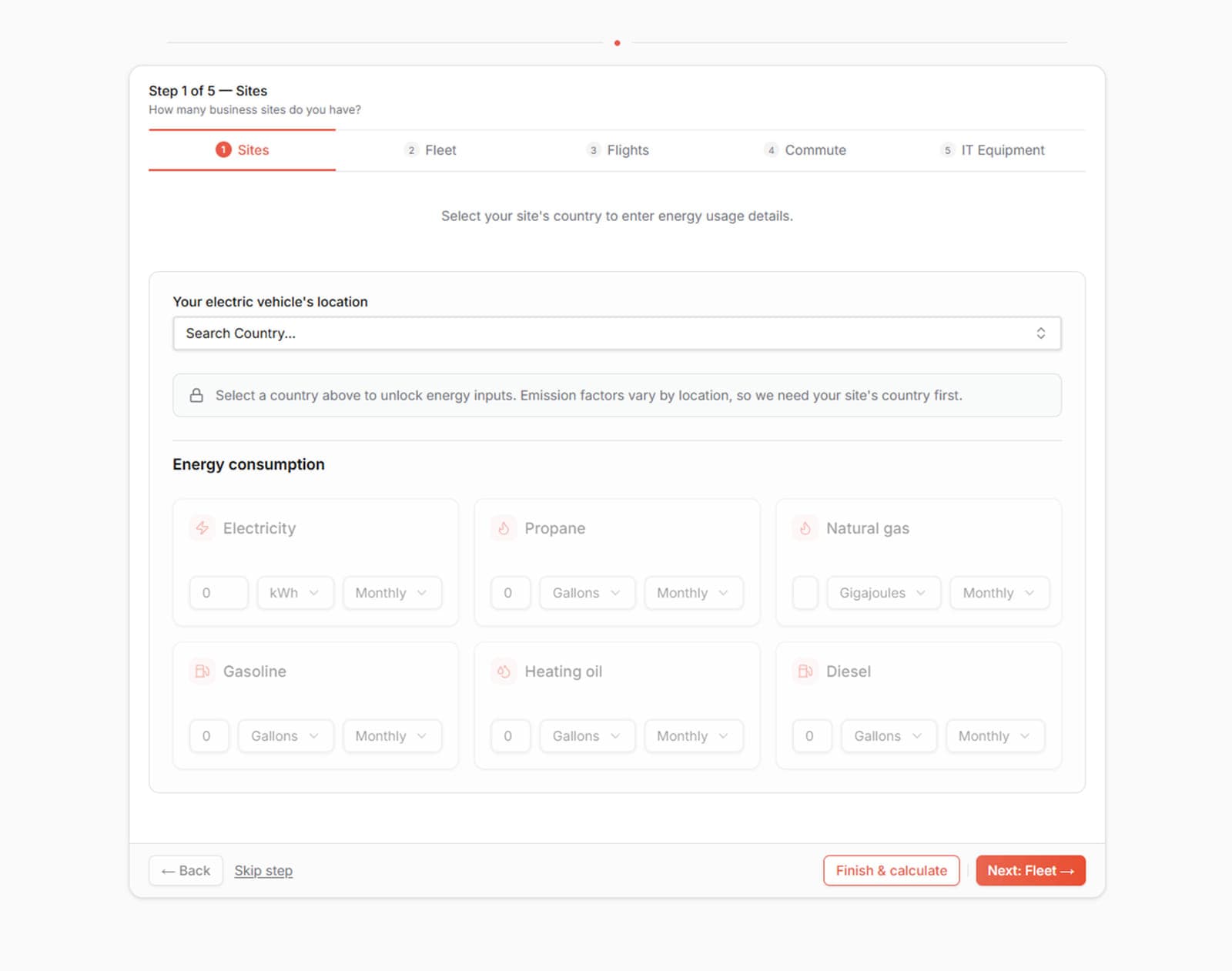
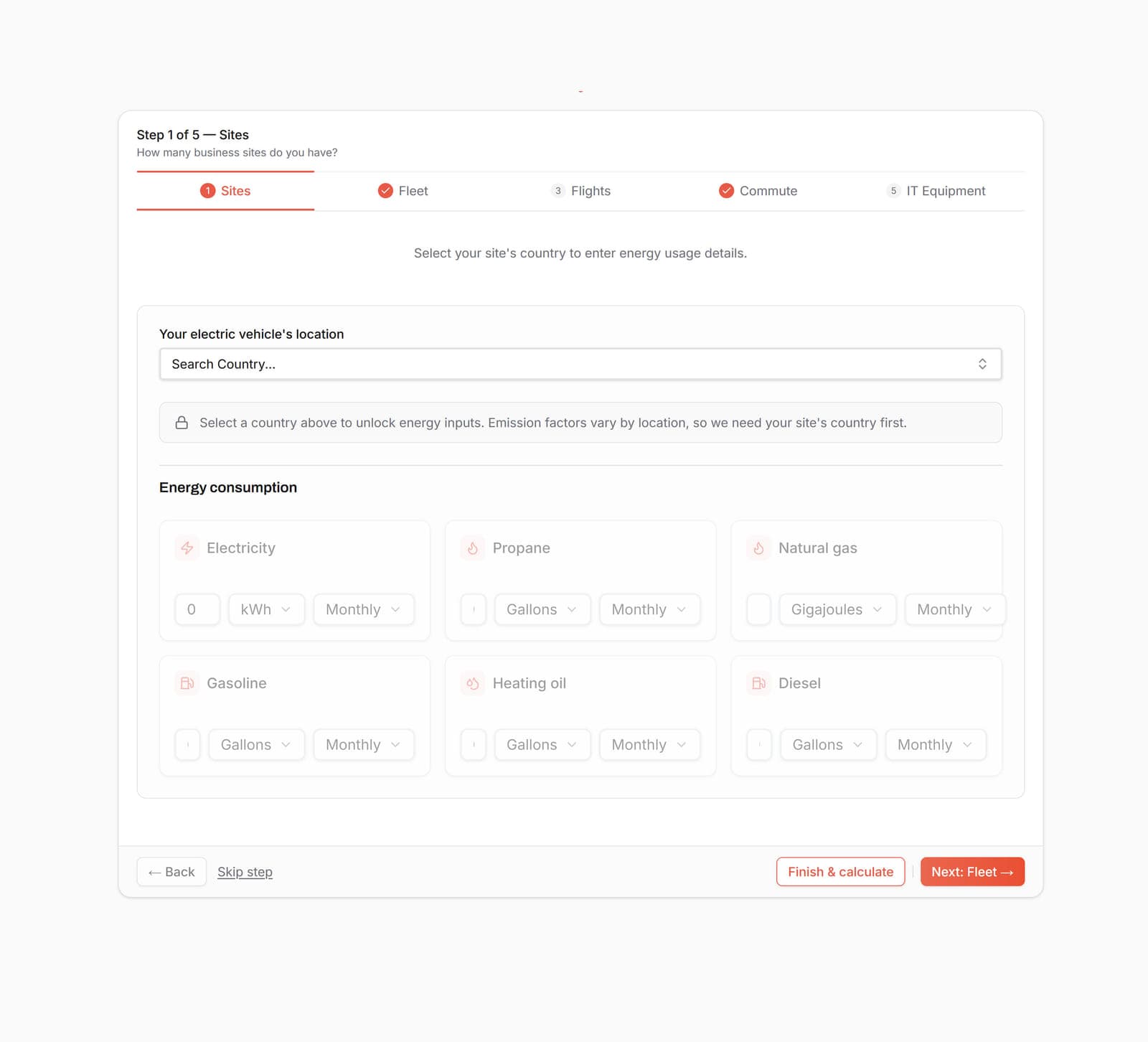
2026 module. Skip step and Finish & calculate sit on every step, so a category can be left out. Preview of the unfinished redesign.
Five categories, one calculation
Sites, fleet, flights, commute, and IT equipment each own their fields. Shared progress, Back, and Next keep them one calculation. These are the 2026 steps. The portal still called the last one Server.
Problem and users
Businesses needed to report emissions across sites, vehicle fleets, flights, employee commuting, and IT equipment without facing one overwhelming form. The frontend could not accept internally inconsistent data, and it could not send a request shape that changed with every UI branch.
The difficult part was not choosing a form library. It was learning the domain well enough to decide which questions depended on earlier answers, which rules belonged in the interface, and which calculations stayed authoritative on the back end.
Contribution
I owned
- Information flow and step structure across the five categories.
- Conditional form behavior and frontend validation.
- React Hook Form, Zod, and Zustand boundaries.
- Country and region, vehicle, unit, and period dependencies.
- Stable frontend-to-API request transformation.
- Loading, error, navigation, partial-result, and results states.
- Saved, editable portal calculations, including unsaved-changes handling and per-category offsets handed to the cart.
- Frontend architecture and implementation for the 2026 module.
- Unit and component tests in the 2026 calculator module.
I partnered with
- Sustainability specialists, to understand and validate domain rules.
- Back-End developers, on calculation boundaries and request contracts.
- Designers and stakeholders, on flow, language, and priorities.
Not mine
- Emissions factors and methodology.
- Back-end calculation services.
- Business adoption or traffic outcomes.
Learning the rules before modelling the form
I worked with sustainability specialists to map realistic reporting scenarios, and with Back-End developers to decide what the interface validates and what the back end calculates. The steps above are the interface. These three branches are the rules behind Sites, Fleet, and Commute.
Step · Sites
When
The site country has regional emission factors (for example Canada or the United States)
Then
A region is required before the site can be saved.
When
No energy value is above zero
Then
The site is rejected with one message on the first energy field.
Separating form state, domain state, and API shape
Each layer has one job, which made each boundary easier to reason about and to test.
React Hook Form
Interaction, touched state, and field errors.
Zod schemas
Domain rules, including the conditional ones above.
Zustand stores, one per category
Saved work across steps, so going back does not lose answers.
Request helpers
Converting flexible form values into one stable payload per category.
Back-end calculation
Emissions factors and the authoritative result. Not frontend work.
Keeping the request shape stable
Form values stay flexible for the interface. The request does not. For an electric fleet, numbers are parsed, field names match the API, and the fuel type is set by the vehicle choice rather than by the user.
{
  vehicleType: "EV",
  numberOfVehicles: "3",
  mileage: "15000",
  country: "Canada",
  region: "Alberta"
}{
homeBase: "Canada",
province: "Alberta",
vehicleType: "EV",
numberOfVehicles: 3,
annualMileage: 15000,
fuelType: "Electric"
}Designing failure and partial-progress states
Users skip optional categories, go back, hit failed requests, or finish with only some categories filled in. Each of those needs a clear state, not only the happy path.
Validation
Messages appear on the field that needs attention, in domain language.
Skipped step
Every category can be skipped. The 2026 step footer keeps Skip step beside Finish & calculate, and progress still shows where the user is.
Request failure
A failed calculation explains itself and the user can try again. Saved answers stay as they were.
Partial result
A calculation can finish with only some categories. In the portal, one category can also be handed to the cart on its own.
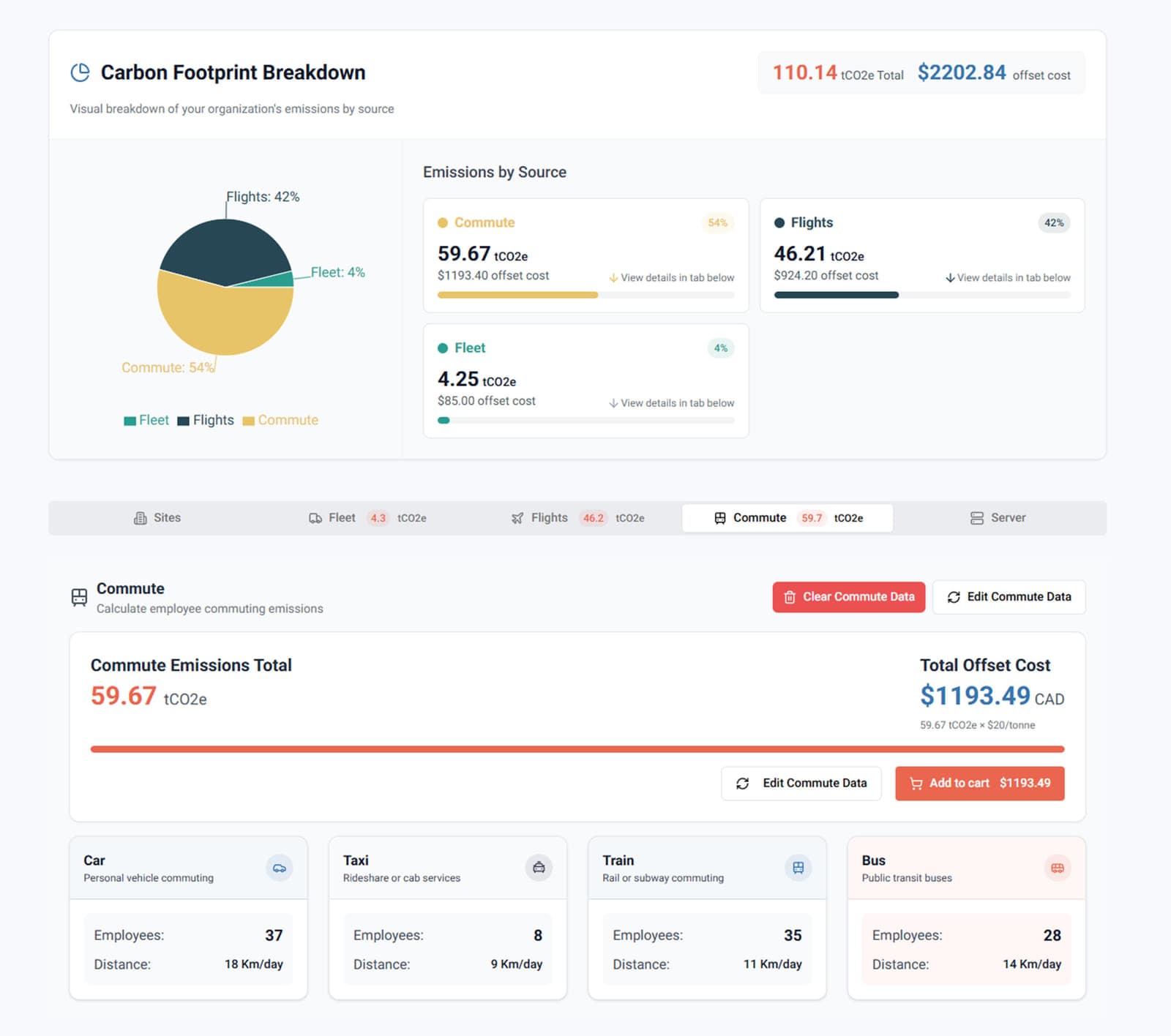
Fleet, flights, and commute are filled in; Sites and Server are not. Commute can go to the cart by itself. Amounts are sample figures. Checkout stays in the Karbon-X case study. Unsaved changes
Leaving an edited calculation asks for confirmation first.
Making the result readable
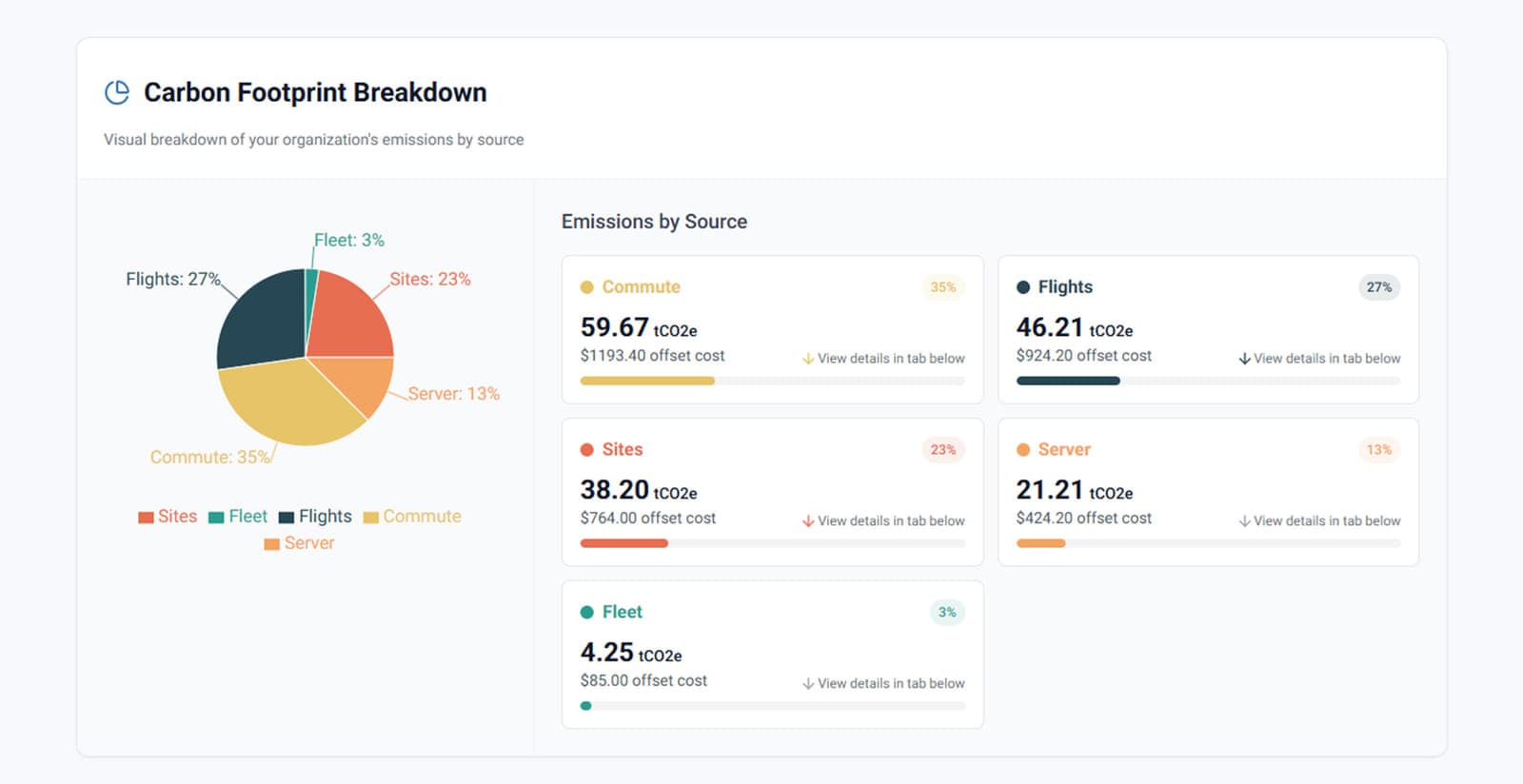
The breakdown pairs a chart with a card per category, so totals and shares are also available as text. Each card points to the category details below it.
Testing the risky boundaries
The 2026 module tests the schemas, the conditional validation, the request helpers, and each step component. The tests cover the places where a wrong answer would reach the API: rule branches and payload mapping.
A run on October 2, 2026 recorded 95 passing unit and component tests. I will treat that count as final once the suite is rerun against one commit.
- Schemas: conditional region, electric and fuel-powered vehicles, commute pairs, and at-least-one-input rules.
- Request helpers: number parsing, field renames, and defaults.
- Step components: validation messages, Next, Back, and Skip, and finishing early from saved totals.
- Failure paths: a failed request shows an error and leaves saved work unchanged.
Outcomes
Initial launch
The public calculator shipped in October 2024 with the first platform, in time for the start of the Edmonton Oilers season.
From estimate to saved work
It moved from an anonymous estimate into saved calculations in the portal, then into the 2026 redesign.
Rules outside the components
Conditional rules and request mapping live in Zod schemas and helpers, separate from the step components.
Room for incomplete work
Skipping a step, finishing early, a failed request, and unsaved changes each have a clear path, so a partial calculation does not throw away the work already done.
I am not claiming traffic, conversion, or adoption. Those were not measured.
Limitations and reflection
- The 2026 module is part of a redesign that was unfinished as of May 2026.
- There is no analytics baseline, so this page does not claim business impact.
- Portal amounts in the captures are sample figures, not a customer result and not a measured outcome.
The project changed how I approach complex forms. The hardest frontend work often happens before the component is written. Early conversations with domain experts produced simpler rules, clearer interfaces, and more stable tests than framework knowledge alone could provide.
Next project
Dayflow
A collaborative visual routine planner I designed and built independently.
Dayflow case study, coming soonContact
Email is the direct way to reach me. LinkedIn and GitHub are here too.